
Proof of identity
A national ID, passport or driving licence, photographed on a flat surface with all four corners visible and no glare across the text.
Sign in and sign up
Opening an account and signing in are the first two things every Ethiopian player does. Both take under two minutes once your phone number is ready. This page walks through the Arada Bet registration steps, the sign-in screen and password recovery. It also covers the verification check that unlocks withdrawals.
Registration runs on the operator's own site or inside the Android app, and it needs one Ethiopian phone number. The whole form is four fields long, so most players finish it before the kettle boils. Keep the handset beside you, because a one-time code arrives by SMS.
You cannot complete the process on this page. aradabet-bet.com publishes reviews only. Every account is opened on the Arada Bet domain through the button below.
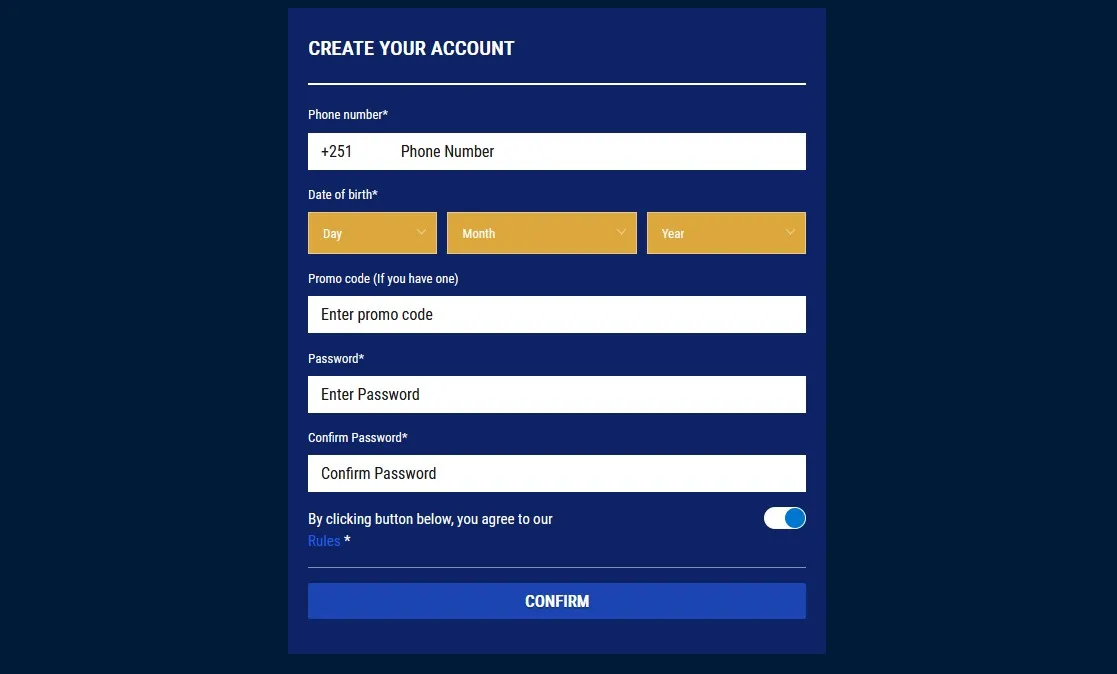
The sign-in screen is the first thing you meet on a return visit. Type the phone number you registered with, add the password and confirm. Sessions stay open on your own handset until you sign out, which saves the daily re-entry.
If the screen refuses the password, check the keyboard language before you assume the worst. A stray capital letter from a shift key explains most failed attempts.
| Route | What you need | Typical time |
|---|---|---|
| Website | Phone number and password | Under 1 minute |
| Android app | Same details, saved session | Seconds after first entry |
| Mobile browser | Phone number and password | Under 1 minute |
| Password reset | Registered phone number plus SMS code | 2–3 minutes |
Almost every Ethiopian player arrives on a handset, so the mobile path is the main path. The same account works in the browser and in the Android application, and the wallet never splits between them. Signing in on a phone takes one thumb and one code.
The layout adapts to small screens without hiding the cashier. Buttons stay large enough to tap, and the action bar keeps the sign-up route within reach while you scroll.
Three habits make phone sign-in safer on a shared device. Use a screen lock, avoid saving the password in a public browser and always sign out on a borrowed handset.
The recovery flow sends a one-time code to the registered number, then asks for a new password. It works on the website and inside the app, and it takes about three minutes in total. You cannot recover an account from an unregistered number.
Careful: nobody from support will ever ask for your password or a one-time code. Anyone who does is trying to take the account.
Finishing Arada Bet registration online does not unlock payouts on its own. The operator runs an identity check before the first withdrawal. A failed match between your name and the payout line is the usual cause of delay. Send a clear photograph of the document, not a screenshot.
Once the check passes, the same wallet handles deposits and payouts without further paperwork. Verification also lifts the deposit ceiling that applies to unverified accounts.
A national ID, passport or driving licence, photographed on a flat surface with all four corners visible and no glare across the text.
The account name, the document and the mobile money line must agree. Fix a spelling difference with support before you request a payout.
Players must be 18 or over. The date of birth you entered at sign-up is checked against the document you upload.
Most checks close within a few hours on a working day. Weekend submissions can sit until the next morning.
Four faults cover almost every failed attempt, and each has a short fix. Work through them before you contact support, because the first reply will ask for the same checks.
| Symptom | Likely cause | Fix |
|---|---|---|
| SMS code never arrives | Network delay or a full message inbox | Wait two minutes, clear space, then request a new code |
| Password rejected | Wrong keyboard or an old password | Retry once, then use the reset flow |
| Number already registered | An earlier account on the same line | Recover that account instead of opening a second one |
| Page will not load | Stale browser cache | Reload, then clear the cache for the site |
One account per person is the rule on this market, and a duplicate registration usually freezes both wallets. If you already own an account, ask support for a password reset instead of signing up again. The aradabet login screen is the same door for every player, whether you type the name with or without a space.
The account is tied to the mobile number you registered with, so the sign-in field expects that number. Email is used for support replies rather than for the login itself.
The form takes about two minutes if the SMS code arrives promptly. Verification adds a few hours on a working day, and it must be finished before your first payout.
No. The app uses the same phone number and password as the website, and it opens the same wallet. Download it only from the operator's own site.
There is no native iOS application. iPhone owners sign in through the mobile browser version, which carries the same wallet, markets and cashier.
Contact support with proof of identity and the last deposit reference. They can confirm the masked number on the account, but they will not move an account to a new line.
Registration is short, sign-in is shorter, and the only slow step is the identity check. Open the account with a number you will keep, save the password properly and finish verification early.
Do that and the wallet behaves as described on this page. Skip the verification and you will meet a payout limit at the worst moment.